Agent
An agent is essentially your own custom LLM that has the additional capabilities of tools attached to it.
An agent can intelligently choose appropriate tools to invoke based on a request provided to it.
When used in a chatbot, an agent can speak to a user with your custom voice, and ask the user guiding questions in order to invoke tools. When used in an offline setting, an agent can invoke tools where, based on the output of another tool, decide what needs to be done.
For example, if I were creating an blog writing agent, I would set up a weekly job that scours the internet for common terms about agentic, and then, based on the terms, researches and writes some custom blog posts that I can later add to my website.
Defining an Agent
First, provide your agent a name that defines, at a high level, what your agent will do. For example, if an agent is writing blogs for you, call it the "BlogWriter".
Next, provide a detailed description on when this agent will be useful to use.
Agent Instructions
After creating your agent, you may want to provide it some instructions that it should always follow. Think of this like a protocol that you may want to follow.
For example, for my blog writing agent, it should always follow a series of steps to check the internet for topics, check my existing blog to see what topics I currently have published, do research on its selected topic, and then finally write a blog.
For conversational agents, you may find this step to be less important, as the user will be dynamically discussing with the agent for what they need - but some high level instructions can still be helpful.
Linking Tools
Next, an agent is nothing without its unique capabilitites!
You can either create a new tool that works with the agent (giving a good name and description), or can reuse your existing tools that you may have made before.
Remember that the tool name, tool description, and argument descriptions are how the model chooses the appropriate functions to call and when, so make sure to make these as clear as possible.
Testing Your Agent
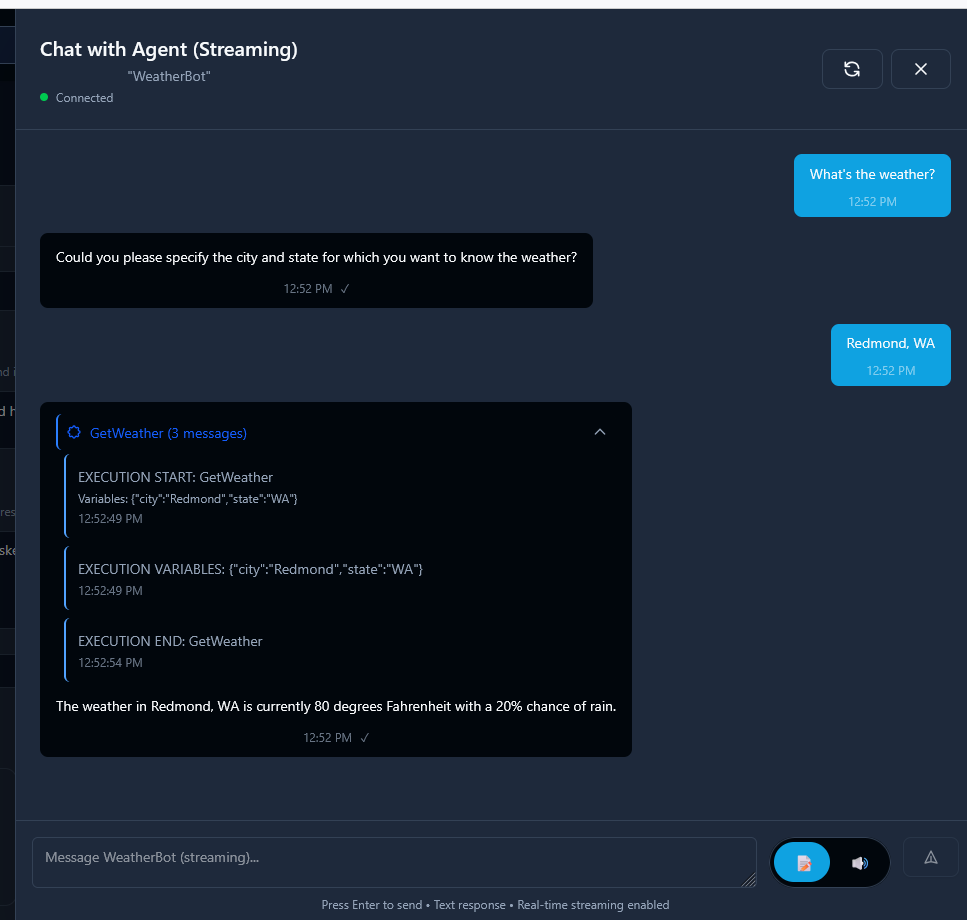
You can test your agent conversationally once you save your agent. Send a prompt (or starter sentence) and watch it invoke tools to figure out how to solve your problem!
Testing With Audio
You can also request multimodal outputs, so you can also request your output to be an "AUDIO" format. In this case, you can see how the messages will sound when your agent is invoked.